Guides / Planning
How to plan B-roll from your script before you film
B-roll is everything on screen that is not you talking: the thing you are describing, your hands, the place, a screen recording. It is also what you usually remember you needed after you have packed the camera away.
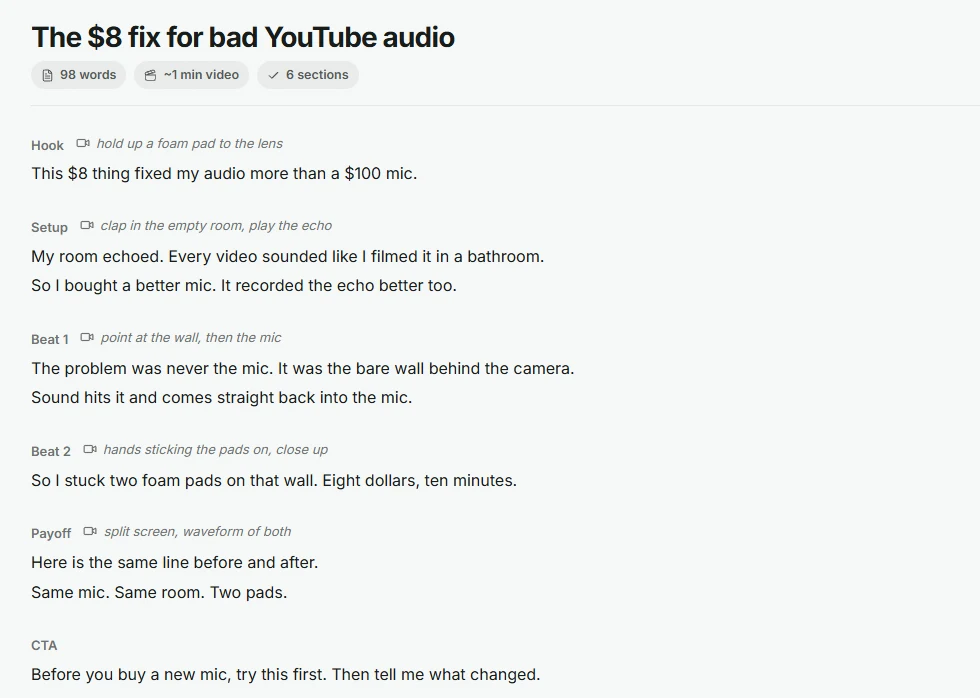
The fix is to plan it in the script. Next to every line, write what the viewer should see.
From script line to shot
Read your script and ask, for every line: what would make this easier to picture?
Shot notes are short and concrete. Not "something about audio", but what is in the frame.
Four kinds of B-roll
Proof shots matter most. When you say a number, put it on screen.
Turn the notes into a shot list
- Copy every shot note into one list.
- Group them by place: everything at the desk, everything outside, every screen recording.
- Film each group in one go, in any order. The script tells you where each one goes later.
- Tick them off as you film. Anything left is a gap you can see before editing, not after.
Shot notes in Cuely
Write (Show: ...) on its own line in a Cuely script and it turns into a shot note under that section, set apart from the words you say. The word count ignores it, and the Writing Agent adds shot notes for you when it drafts a script.
Questions
How much B-roll does a video need?
Enough that the screen changes when the idea changes. In a talking video that is often every 10 to 20 seconds, and more often in the hook.
Can I use stock footage?
Yes, for mood shots. For proof and action shots your own footage is much better, because viewers can tell it is the real thing.