Guides / Planning
How to plan a YouTube series, and keep it going past episode 3
Most series do not fail on episode 20. They stall on episode 3, when the ideas planned in one burst run out and every new episode has to be invented the night before.
The fix is to plan the arc first and the episodes second. This guide shows the way we do it in Cuely, using a real series with a promise, a job for each episode, and a roadmap you can reorder.
Why series stop after a few episodes
A series is a list of videos that only make sense together. If you can swap episode 4 and episode 2 and nobody notices, you have a playlist, not a series.
Playlists are fine. But a series gives a viewer a reason to come back for the next one, and that is the thing small channels need most. It only works if every episode is planned against the whole.
Step 1. Pick a promise, not a topic
A topic is "how to start a YouTube channel". A promise is "after six episodes you can publish your first video". The promise tells you what belongs in the series and, more usefully, what does not.
In Cuely, open the Roadmap and choose Create series. You enter a topic, how many episodes, and an optional goal. Write the goal as the promise. Then either create an empty series and fill it yourself, or generate the episodes and edit them.
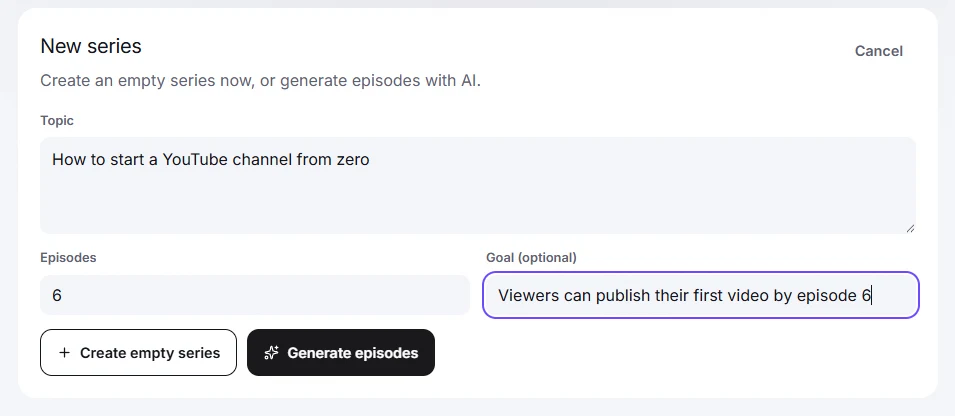
Five to eight episodes is a good first series. It is easier to extend a series that works than to finish one that does not.
Step 2. Give every episode a job
Look at the generated episodes the way a viewer would. The first one has to open the series: it makes the promise and shows the first small win. The last one pays it off. The ones in between each remove one thing that stops the viewer from getting there.
Cuely labels each episode with its role in the series, for example "Opens the series" and "Pays off the series", next to an opportunity score. Treat the score as a rough signal for which episode to script first, not as a forecast of views.
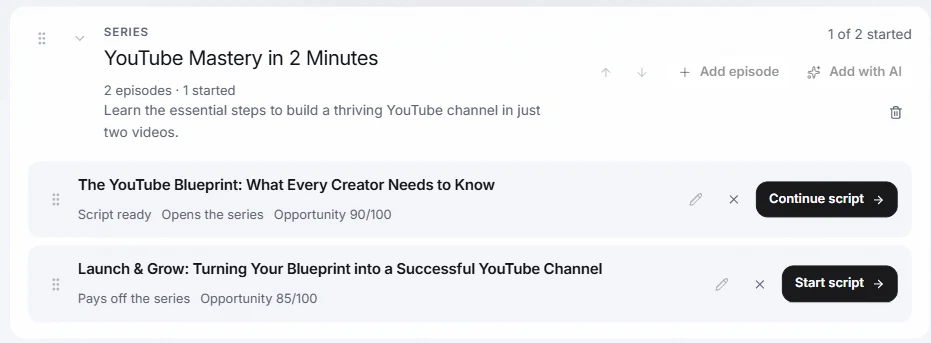
- If two episodes have the same job, merge them.
- If an episode has no job, cut it.
- If the viewer needs something that is missing, add an episode for it with Add episode, or ask for more with Add with AI.
Step 3. Keep one roadmap for everything
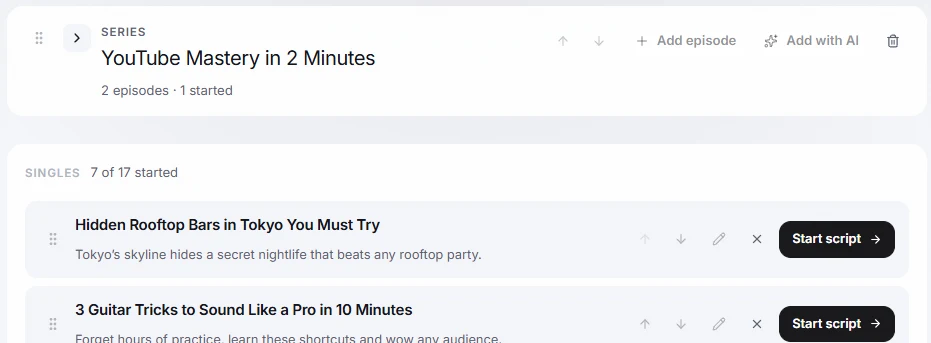
Series are only part of the plan. You will also have single videos that do not belong to any series. The Roadmap keeps both in one place: series on top, singles below, each with a Start script or Continue script button.
You can reorder with the arrows or by dragging. Reordering is the point: when an idea gets stronger, move it up, and the plan reflects what you will actually film next.
Step 4. Script the first two episodes before you film either
This is the cheapest test of a series. Write the script for the first two episodes, then read them back to back. Does episode 2 start where episode 1 stopped? Does episode 1 end with a reason to watch the next one?
If the answer is no, the problem is in the plan, and fixing it now costs minutes instead of a reshoot. When both scripts connect, you can film with a plan you trust. For the writing step, see how to write a script in your own voice with AI.
A quick test before you commit
Ask three questions about the series you just planned:
- Can I say the promise in one sentence a stranger would understand?
- Does each episode earn its place by doing one job?
- Do I have a script for episode 1 and an outline for episode 2?
Three yeses and you are ready to film. A no tells you exactly where to go back to.
Questions
How many episodes should a first series have?
Five to eight. That is long enough to build a habit in the viewer and short enough to finish. Extend it later if it works.
Can Cuely generate the whole series for me?
Yes. Enter a topic and a goal on the Roadmap and choose Generate episodes. You then edit the episodes, reorder them and script them one by one. Treat the result as a first draft of the plan.
What is the difference between a series and a playlist?
In a series the order matters and each episode builds on the last. In a playlist the videos only share a theme. Both are useful, but only a series gives viewers a reason to watch the next episode right away.
Is the Roadmap free?
The free Hobby plan includes the studio workflow. Limits on the number of roadmap items depend on your plan.