Guides / Writing
A YouTube script template for small channels (copy and paste)
A template does not write your video for you. It stops you forgetting the parts that keep people watching: a hook that makes a promise, a turn every minute or so, and an ending that pays the promise off.
Here is the structure we use in Cuely, what goes in each part, and a short filled-in example.
The template
Copy this into any doc, or start from it in Cuely:
- [HOOK] Two or three lines. The specific promise or stake. (Show: what is on screen in the first seconds)
- [SETUP] Why this matters to the viewer, and what you tried or found. Keep it under 30 seconds.
- [BEAT 1] The first point, with one concrete example.
- [BEAT 2] The second point. Start it with a turn: "But here's the problem."
- [BEAT 3] The third point, or the moment it went wrong or right.
- [PAYOFF] The thing the hook promised, said plainly.
- [CTA] One ask: the next video, a comment question or subscribe. Only one.
Three beats suit a 5 to 8 minute video. For a Short, keep only HOOK, one BEAT and PAYOFF.
What to write in each part
- HOOK: the promise in words the viewer would use. See our hook examples.
- SETUP: one reason to care, plus who you are only if it matters for this video.
- BEATS: one idea each, one example each. If a beat runs over about 200 words, split it or cut it.
- PAYOFF: deliver exactly what the hook said. Not a summary.
- CTA: short, specific and after the payoff.
Write one thought per line. It is easier to read on camera and easier to cut later.
A short example
Topic: "Why my first 10 YouTube videos flopped"
- [HOOK] My first ten videos got 3 to 39 views. It wasn't the camera. It was the first sentence.
- [SETUP] I checked the retention graph on all ten. Every one dropped in the first 15 seconds.
- [BEAT 1] Every video started with "Hey guys, today I'm going to..."
- [BEAT 2] But the worse problem was the title. It described the topic, not the reason to click.
- [BEAT 3] So for video eleven I changed both. Same camera, same room.
- [PAYOFF] [what happened to video eleven, your real numbers]
- [CTA] What's the first line of your last video? Tell me in the comments.
Use the template in Cuely
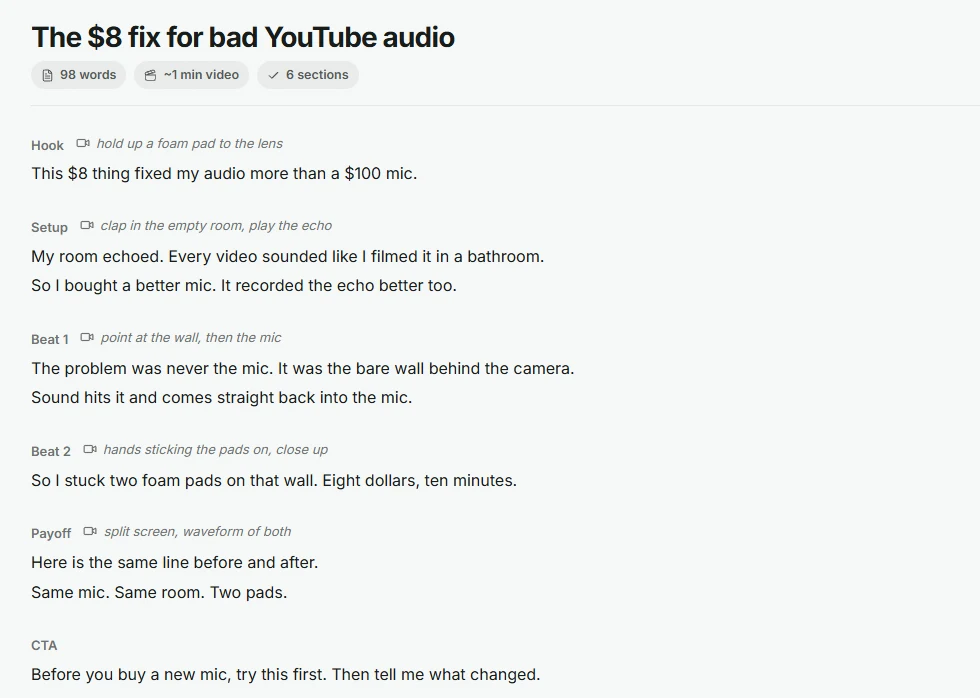
In the Cuely script editor, section names like [HOOK] become small headings and (Show: ...) lines become shot notes next to them, so the template stays readable as the script grows. The Writing Agent fills a template like this for you from a title or an idea, and keeps the parts you already wrote.
Questions
Do I need a different template for Shorts?
Use a shorter one: a hook, one beat and the payoff, around 100 to 150 words in total.
Should every video use the same template?
Use it as a checklist, not a rule. A story video might have five beats; a quick tip might have one. The hook, payoff and one clear ask are the parts worth keeping every time.